WhatsApp and the official API
How the line runs on WhatsApp through its own gateway, and how I would build it on the WhatsApp Business Platform instead.
TL;DR
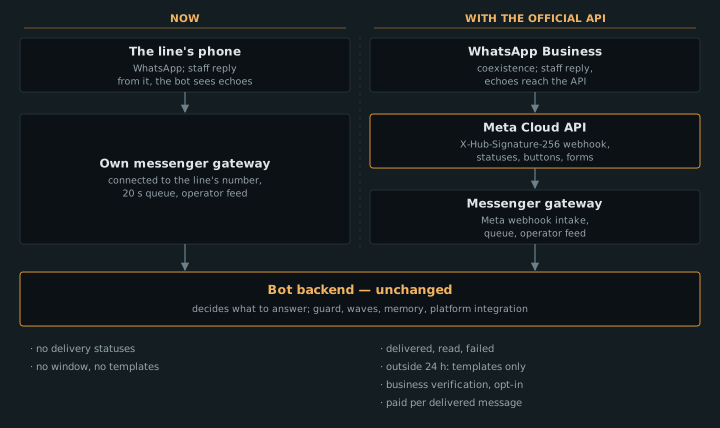
Support Line AI Assistant on WhatsApp is an ordinary store number on a phone in the office, with the store's own messenger gateway connected to it. The gateway receives messages, hands them to the bot and sends its answers, while staff reply from the same phone and the bot sees what they write. The WhatsApp Business Platform (Cloud API) is the official route, under Meta's policy, with delivery and read statuses, buttons and forms. In return it asks for business verification, templates for anything sent outside a 24-hour window, and payment per message. In the log, all 879 of the bot's messages went out inside that window, against 81% of the messages staff sent. Everything about Meta's platform was checked against its documentation on 19 October 2026.
How it works today
The number and the phone
The line is one WhatsApp number on a phone in the store's office. The team answers customers from that phone like any other. The gateway has recorded the line since 23 February 2026, and the bot has been connected to it since 31 July. The bot has no number of its own: the bot and the staff talk to customers through the same one.
The gateway
The store's own messenger gateway is connected to the line's number and receives its messages. It shows them to staff in the operators' feed in Telegram and transcribes voice messages, then waits 20 seconds in case the customer writes more (but no longer than a minute from their first line) and hands the messages to the bot together with the last ten lines of the chat. The bot decides what to answer, and whether to answer at all. Before sending, the gateway checks once more that no person has written in the meantime. Staff reply from the line's phone, and the bot sees their lines in the chat history and stays quiet: that is what the rule "a person is in the chat, so the bot stays quiet" rests on.
What the gateway does not know
The gateway has no delivery or read statuses. For answers this hardly matters, because the bot replies to people who have just written.
The platform's notifications
Order notifications ("confirmed", "driver picked up", "cancelled") come from the store's platform itself, from other numbers on the same gateway. The last line of each says not to reply: nobody reads replies to those numbers. The line's number appears only in the cancellation message. Since 28 September, if a number has no WhatsApp or the send fails, the customer gets an SMS saying the same thing. Volume: 80–130 platform messages a day.
The website chat
The website chat is a channel of its own. It runs over a WebSocket to the bot's backend and has nothing to do with WhatsApp. If the customer is signed in, the chat and the line share one memory card.
How I would build this line on the official API
Point by point below: what the WhatsApp Business Platform would give, what would have to be rebuilt, and how it looks against the line's own figures. Everything about Meta's platform was checked against its developer documentation and policies on 19 October 2026. Meta's terms change, and its prices change only at the start of a quarter.
Transport
Meta runs the Cloud API: messages are processed in its data centres, and the business receives them by webhook. The webhook is signed: the X-Hub-Signature-256 header carries a SHA-256 of the body computed with the app secret. Meta retries webhook delivery for up to 7 days and warns that duplicates can happen; the bot already has idempotency by message ID for that. Meta has closed its self-hosted On-Premises API: since 23 October 2025 it can no longer send messages.
What would go: our own connection to the number and everything that maintains it. What would stay: the gateway as a channel, meaning the webhook intake, the job queue, the operators' feed and the call to the bot.
A number's default throughput is 80 messages a second, or 20 in coexistence mode (more on that below). To one person you can send on average one message every 6 seconds, in a short burst of up to 45. After its text the bot sends at most three pictures, which fits within those limits.
The 24-hour window
When a customer writes or calls, a 24-hour customer service window opens, and each new message from the customer extends it. Inside the window the business can write anything. After it closes, only pre-approved templates can be sent, in three categories: marketing, utility and authentication. Review of a template takes up to 24 hours. A utility template that turns out to be advertising is moved to marketing by Meta itself.
Against the line's figures from 31 July to 19 October:
| Who wrote | Messages | Within 24 h of a customer message | Later than 24 h | No customer message before it |
|---|---|---|---|---|
| Bot: answers | 825 | 825 | 0 | 0 |
| Bot: driver and dispatcher replies carried back | 44 | 44 | 0 | 0 |
| Bot: "the driver hasn't replied yet" | 10 | 10 | 0 | 0 |
| Staff | 25,505 | 20,589 (80.7%) | 3,350 (13.1%) | 1,566 (6.1%) |
The window does not get in the bot's way by design: a job is created only for an incoming message, a thread with the driver lives no longer than 4 hours, and the latest the bot has ever written was 52 minutes after the customer's message. The bot sends no reminders and no "I'll get back to you" messages.
19.3% of staff messages fall outside the window. If staff wrote through the API, those would need templates. One caveat: some of them may be replies to a customer who writes from two identifiers, in which case the real share is lower.
Notifications and the first message
The platform's three notifications would become utility templates with variables: the order number, the car, the link to the order page. The first message to a new customer would also be a template. For messages the business starts, Meta's policy requires the customer's opt-in, naming the business. It can be collected on a website, so checkout would gain a tick box. A sign-in code sent on WhatsApp is a template category of its own, authentication.
If notifications and the line share one number, a customer's reply to "your driver has picked up the order" lands straight in the line. It opens the window, and the bot answers it like any other message. The "do not reply" line disappears. The SMS fallback can then fire on a real delivery failure; today "sent" does not mean "delivered".
Delivery and read statuses
The Cloud API reports the status of every message: sent, delivered, read, played (for a voice message) and failed, with an error code. Today the gateway knows only "sent". There is also a typing indicator: it is turned on together with the read receipt and goes off when you reply or after 25 seconds. It would cover the pause while the bot waits 20 seconds for the customer to finish and then spends a few more seconds writing.
Staff alongside the bot
Today staff reply from the line's phone, and the bot sees their replies and stays quiet while a person is in the chat. On the official API there are two options.
The first: the number leaves the app and moves to the API entirely. Then staff need an interface of their own. The line already has an operators' feed in Telegram, with drafts and a send button, but this project's own experience shows that people reply from the phone and hardly look at the feed. On top of that, 19.3% of staff messages would fall outside the window and need templates.
The second: coexistence, where one number works in both the WhatsApp Business app and the Cloud API. That is the one I would choose. According to Meta's documentation:
- it needs the WhatsApp Business app at version 2.24.17 or later, and onboarding through a Meta partner (a Tech Provider or a Solution Partner) with Embedded Signup;
- chat history from the 180 days before onboarding syncs into the API if the business agrees, and this has to happen within the first 24 hours;
- every message sent from the app arrives in the API as its own webhook (
smb_message_echoes). That is exactly what the "a person is in the chat, so the bot stays quiet" rule depends on; - messages sent from the app stay free, and messages sent through the API are priced as Cloud API messages;
- group chats are not synced, broadcast lists are switched off, and disappearing messages, view-once and live location are disabled in one-to-one chats;
- onboarding unlinks all companion devices. Supported ones can be linked again, except WhatsApp for Windows and WearOS. A message sent from an unsupported device never reaches the API, and the bot would not know a person was in the chat;
- throughput is fixed at 20 messages a second;
- if the main phone is inactive for about 14 days, the connection drops.
Buttons, lists and forms
Today the bot reads the customer's text. It makes an order change only after a "yes" that answers its latest question, and for a cancellation it does not count a "yes" that sits next to a "no". That is several rules and tests around a single word. In the Cloud API it becomes buttons:
- reply buttons: up to three, with labels of up to 20 characters. "Yes" and "no" for an order change arrive as a press with a known value;
- a list: up to 10 rows. It suits picking a new delivery time;
- a URL button: the order page opens from a button instead of a link in the text;
- a location request: a "send location" button, useful for the driver;
- forms (WhatsApp Flows): an address change as a form instead of parsing text. Flows need business verification and a high-quality number.
Meta does not yet support its native address messages in every country. Buttons and lists are messages inside the window; outside it a form can only be sent as a template.
Voice and photos
Today the gateway receives the file together with the message. In the Cloud API the webhook brings a media ID and a URL. The URL is valid for 5 minutes and opens only with a token, and an incoming media ID lives for 7 days. The limits: audio 16 MB, images 5 MB (JPEG or PNG), video 16 MB, documents 100 MB. Transcribing voice messages and describing photos would stay as it is in the bot; only the way of fetching the file would change.
Messaging limits and number quality
The limit applies to messages outside the window: how many different people a business can message first in a rolling 24 hours. The tiers are 250, 2,000, 10,000, 100,000 and unlimited. Since 7 October 2025 the limit is counted across the whole business account, for all its numbers together. Above 2,000 the tier rises on its own if quality is high and at least half the limit was used in the last 7 days. The quality of a number and of each template is rated from recipients' feedback: green, yellow or red. A template in the red is paused by Meta for 3 hours, then for 6, and disabled the third time. A drop in quality no longer lowers the limit.
The platform currently sends 80–130 messages a day, so the starting tier of 250 different recipients would be more than enough. The bot's answers do not count against the limit: they are all inside the window.
Money, without amounts
- Since 1 July 2025 Meta has charged for each delivered message; before that it charged per conversation. The price depends on the category and the recipient's country.
- Marketing, utility and authentication templates are paid at any time. Since 1 October 2026 utility templates inside the window are paid too.
- Free-form messages inside the window (service) have also been paid since 1 October 2026, but the first 1,000 a month per number are free. In the first 19 days of October the bot sent 672 answers on its own, so its volume sits close to that threshold.
- Replies written by a third-party AI count as ordinary service messages.
- Messages sent from the app in coexistence are free.
- Utility and authentication get volume discounts, counted per month.
Admission
- Business verification with Meta. You can start without it, but it unlocks the 2,000 tier, up to 20 numbers, forms and official business account status with the blue tick.
- A display name, which goes through review.
- A number already on WhatsApp cannot be registered on the API until it is deleted from the app, and deleting it loses the chat history. The alternative is coexistence.
- Automation inside the window is allowed as long as the customer has a clear path to a person. The line has one: a request for a person gets the office phone number, complaints and legal questions go to staff before the model sees them, and staff reply from the same number.
- The platform's terms, as revised on 23 September 2026, bar companies whose main product is AI. As I read the terms, a store's support bot is not covered by that, but Meta decides.
Customer identifiers
In 2026 WhatsApp users are getting usernames, and webhooks carry a customer identifier scoped to the business that does not depend on the phone number. If a customer has a username, their phone number may not arrive in the webhook. Today the bot recognises a customer by phone: it uses the number to ask the platform who they are and what orders they have. On the API, customers like that would need a different key: a WhatsApp identifier linked to the store account, or the order number, which the bot can already ask for.
What would not change
- The bot decides what to answer, when and to whom. The gateway stays a channel: it passes facts on and carries out decisions.
- The integration with the store's platform: orders, statuses, links to the order page.
- Passing questions to drivers and dispatchers and carrying their replies back.
- Order changes after a "yes", except that the "yes" would be a button.
- Customer memory, the guard, waves and switches, the rules document, tests and instruments.
What a move would take
Step 1. Decide where staff work
I would choose coexistence: staff keep answering from the phone, and the bot sees their replies by webhook. Without it, staff need an interface built for them, and all their messages outside the window become a problem to solve.
Step 2. A Meta partner and business verification
Onboarding goes through Embedded Signup: either become a Tech Provider yourself or work through a Solution Partner. Meta deprecated Embedded Signup v2 and v3 from 15 October 2026, so the integration has to target v4. In parallel: business verification, the display name, and a two-step verification PIN.
Step 3. Templates and opt-in
The three notifications, the first message to a new customer and the sign-in code are submitted as templates, and review takes up to a day. A tick box for agreeing to receive messages goes into checkout.
Step 4. Code
- The gateway carries most of the work. Its own part of the connection to the number goes, and the handler is rewritten for Meta's webhook: messages, statuses, echoes from the app, history sync. A Graph API client for sending is added. The queue, the call to the bot and the operators' feed stay.
- The bot needs little. The gateway builds the "person in the chat" signal from the app's echoes into the same history, so nothing changes for the bot. New: a button press instead of a typed "yes", delivery statuses written to the log, and a customer key without a phone number.
- The platform: templates instead of notification texts, an SMS on "not delivered", and the opt-in tick box.
Step 5. Switching over without downtime
Onboarding to coexistence cuts off the old connection, so the new path has to be ready first:
- Bring up the Meta webhook intake alongside the old path and test it on a test number on the Cloud API.
- Run the bot on the test number with sending switched off: drafts instead of answers.
- Onboard the line's number at a quiet hour. The old connection is unlinked, Meta webhooks start arriving, and staff keep working in the app. 180 days of history sync within the first day.
- Switch the bot's sending back on one class of answers at a time, as was done with the waves.
- The way back: disconnect the number from the platform in the app's business platform settings and bring the old connection back.
Today and with the official API
| Today | Official API | |
|---|---|---|
| Transport | own gateway | Meta webhook, Cloud API |
| Statuses | only "sent" | sent, delivered, read, failed |
| Bot messages | all within 24 h, no restrictions | all inside the window, free-form |
| Staff messages after 24 h | 19.3%, no restrictions | templates only, if sent through the API |
| Staff | reply from the phone, the bot sees echoes | coexistence: the same, by webhook |
| "Yes" to an order change | parsing text | a button |
| Address | parsing text | a form (WhatsApp Flows) |
| Notifications | other numbers, "do not reply" | utility templates, possibly from the line's number |
| Money | no Meta charges | for delivered templates; service after 1,000 a month |
| Admission | not needed | business verification, display name, policy |
Questions people ask most
Does a store need the official API?
It depends on which costs the store more. The API is the official route, under Meta's policy, and brings delivery statuses and buttons. In return it needs business verification, templates, customer opt-in and payment per message. For a store with one line, where staff answer from a phone, it makes sense to count the 24-hour window and the volume first, as this page does.
What gets simpler, and what gets harder?
Simpler: there is no connection of our own to maintain, and there are statuses, buttons and forms. Harder: every message outside the window is an approved template, notifications are templates with opt-in, and both money and the number's quality have to be watched. The bot barely changes: it already writes only in reply to a customer.
What happens to the people on the line?
In coexistence, nothing new: they reply from the phone in the WhatsApp Business app, and the bot sees their replies by webhook and stays quiet while a person is in the chat. Without coexistence they would need an interface of their own, and their messages outside the window would turn into templates.
What this page does not claim
- That the store is moving to the official API, or that a move has a date.
- That Meta's terms will stay as they are: everything was checked on 19 October 2026.
- What a move or the messages would cost: prices are left out on purpose.